Table of Contents
Open Table of Contents
1 原码 & 反码 & 补码
原码是数字在计算机中的二进制表示形式,包括符号位和数值位。对于正数,原码与其真值(即十进制数)相同。对于负数,原码是其在补码表示下的反码再加1。
反码是原码的符号位除外,其余位取反。无论正负,反码都是原码的反转。
补码是反码再加1。对于正数,补码与原码相同;对于负数,补码是其在反码表示下的加1。
2 无符号 & 有符号数
在有符号数中,最高位(最左边的位)用作符号位,1表示负数,0表示正数。例如,一个8位的有符号整数可以表示范围为-128到127的整数。
无符号数则没有符号位,所有的二进制位都用于表示数值。无符号整数的取值范围通常是从0到2的n次方-1,其中n是二进制位的位数。例如,一个8位的无符号整数可以表示范围为0到255的整数。
3 加减法例程
无符号数计算需要注意进位:写代码时要注意进位,防止溢出。
module unsign_plus(
    input clk,
    input [7:0] a,
    input [7:0] b,
    output reg[8:0] c
);

    // unsign plus
    always @(posedge clk) begin
        c <= a + b;
    end


endmodule //unsign_plus
有符号数计算需要注意复制符号位:要注意位宽问题,可能需要复制符号位.
module sign_plus(
    input clk,
    input [7:0] a,
    input [7:0] b,
    output reg[8:0] c
);

    // sign plus
    always @(posedge clk) begin
        c <= {a[7], a} + {b[7], b};
    end

endmodule //sign_plus
TestBench代码:
`timescale 10ns / 1ps

// ...

module test_calcu1();       // test bench

    parameter Period = 0.4; // Period
    reg clk;                // Simu Clock Signal
    reg reset;              // Reset all signal

    reg[7:0] a1;
    reg[7:0] b1;
    reg[7:0] a2;
    reg[7:0] b2;
    wire[8:0] outp1, outp2;
    unsign_plus up(
        .clk(clk),
        .a(a1),
        .b(b1),
        .c(outp1));
    sign_plus sp(
        .clk(clk),
        .a(a2),
        .b(b2),
        .c(outp2));

    // Generate clock signal
    always begin
        #(Period/2) clk = ~clk;
    end

    initial begin           // setup run
        clk = 0;
        reset = 0;

        repeat(100) begin
            @(posedge clk);
        end
    end

    initial begin           // test display
        a1 = 127;
        b1 = 127;
        a2 = -5;
        b2 = -7;
        $display("Hello world: %t!", $realtime);
    end

endmodule
例程输出:
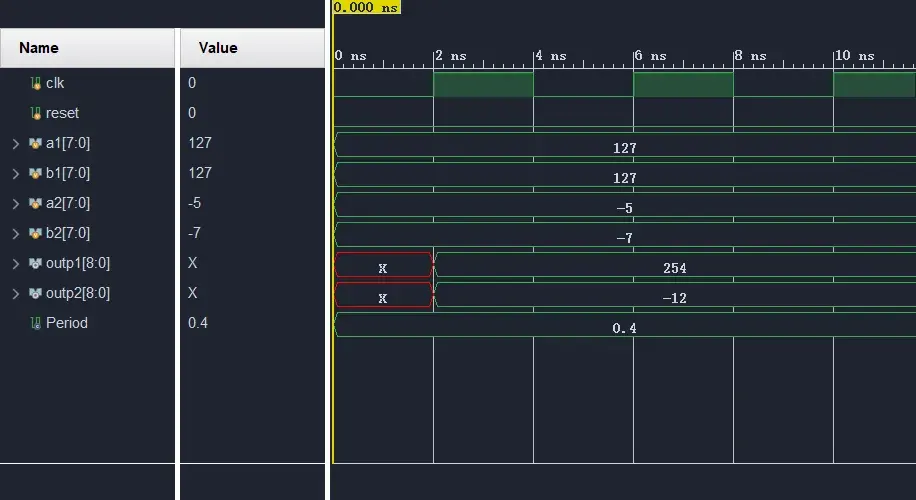
对于位宽不同的加减法,需要注意复制符号位:
A: 8, B: 6, C: 8

C = A + {2{B[6]}, B}
4 Signed 关键字
在verilog中,有符号数可以加signed关键词来修饰,表示这个寄存器或变量是有符号数,没有加signed修饰,默认就是无符号数。修改模块如下:
module test_calcu1();       // test bench

    // ...

    reg[7:0] a1;
    reg[7:0] b1;
    reg signed [7:0] a2;    // `signed`
    reg signed [7:0] b2;    // `signed`
    wire[8:0] outp1;
    wire signed [8:0] outp2;// `signed`

    // ...

    initial begin           // test display
        a1 = 127;
        b1 = 127;
        a2 = -10;
        b2 = 5;
        $display("Hello world: %t!", $realtime);
    end

endmodule

// ...

module sign_plus(
    input clk,
    input signed [7:0] a,           // `signed`
    input signed [7:0] b,           // `signed`
    output reg signed [8:0] c       // `signed`
);

    // sign plus
    always @(posedge clk) begin
        c <= a + b;
    end

endmodule //sign_plus
例程输出:
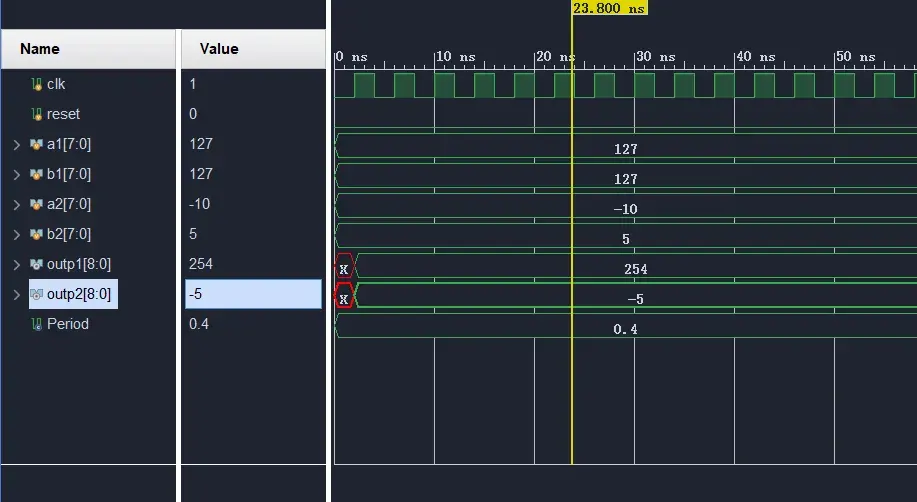
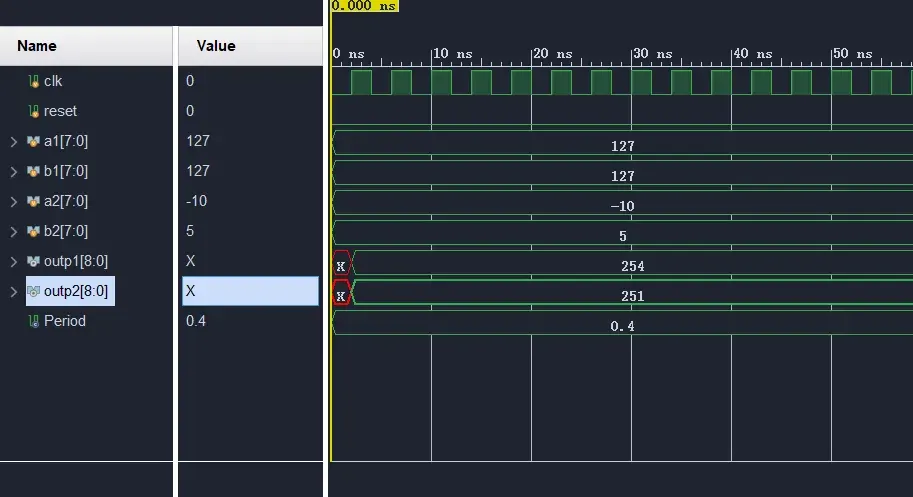
如果其中有signed和无signed混用则会计算错误:
module sign_plus(
    input clk,
    input signed [7:0] a,           // `signed`
    input [7:0] b,                  // error
    output reg signed [8:0] c       // `signed`
);

    // sign plus
    always @(posedge clk) begin
        c <= a + b;
    end

endmodule //sign_plus
例程输出:
5 求绝对值
计算公式很简单,对于负数,取反加1,对于整数,取原值即可:
module sign_abs(
    input clk,
    input signed [7:0] a,
    output reg a_sign,      // 1: negative, 0: positive
    output reg[8:0] a_abs   // absolute value
);

    always @(posedge clk) begin
        a_sign <= a[7];
        a_abs <= a[7] ? (~a[6:0] + 1) : a[6:0];
    end

endmodule //sign_abs
根据符号位和绝对值,恢复原值,也很简单:负数取反加1,正数拓展高位0.
module sign_abs_recover(
    input clk,
    input a_sign,      // 1: negative, 0: positive
    input [6:0] a_abs,  // absolute value
    output reg[7:0] a     // original value
);
    always @(posedge clk) begin
        a <= a_sign ? (~{1'b0, a_abs} + 1) : {1'b0, a_abs};
    end

endmodule //sign_abs_recover